Before you start
- An email address (Gmail, Outlook, iCloud, etc.)
- A phone number (digits only, no hyphens)
- An address in Japan, including the 7-digit postal code
- Your name in katakana (Japanese phonetic letters), e.g. Smith → スミス
Tip: your browser can translate the booking site. In Safari, tap aA in the address bar and choose “Translate to English”. In Chrome, tap the menu and choose “Translate”. The labels in this guide are the original Japanese, so you can match them either way.
Don’t have a Japanese phone number or address? Please message us on LINE before booking.
Choose a location
Each button opens that location’s booking calendar in a new tab, so you can keep this guide open alongside it.
Addresses and stations for each location are on the English top page.
1. Choose a time slot
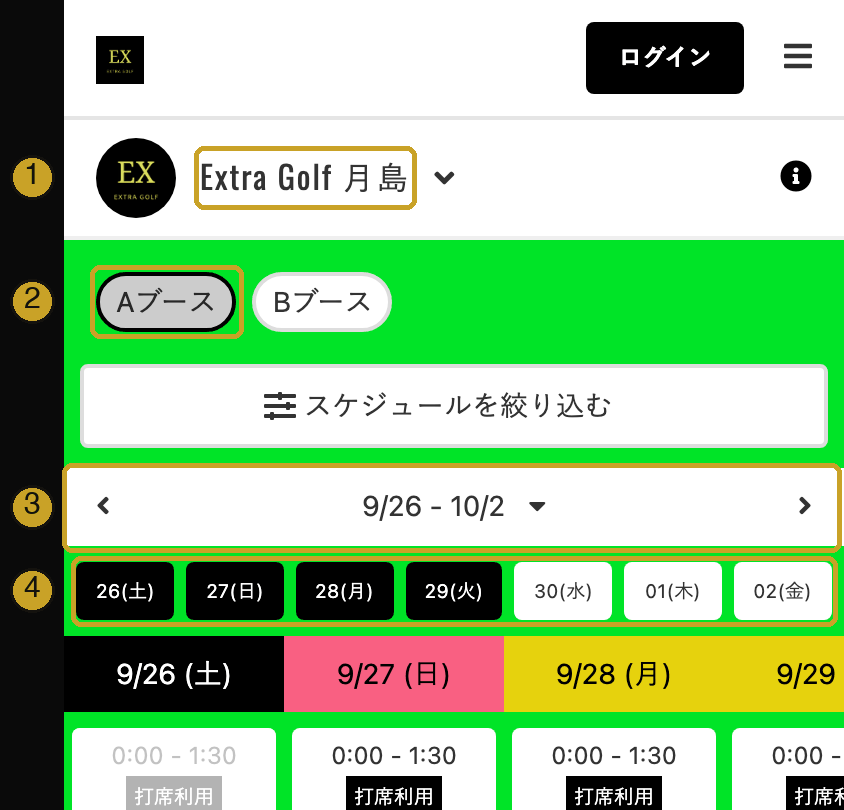
- Location name. Tap ▼ to switch to another location.
- Booth tabs. Aブース = Booth A, Bブース = Booth B (Shibaura and Tsukishima have two booths). At Shibaura, 左右あり means left- and right-handed and 右のみ means right-handed only. Shibaura also has Cミーティングルーム (meeting room) and 駐車場予約 (parking) tabs. These are not for the trial.
- Week. Use ‹ › to move to the previous or next week.
- Days. Tap a day to jump to it. The calendar shows three days at a time, so swipe sideways to see more.
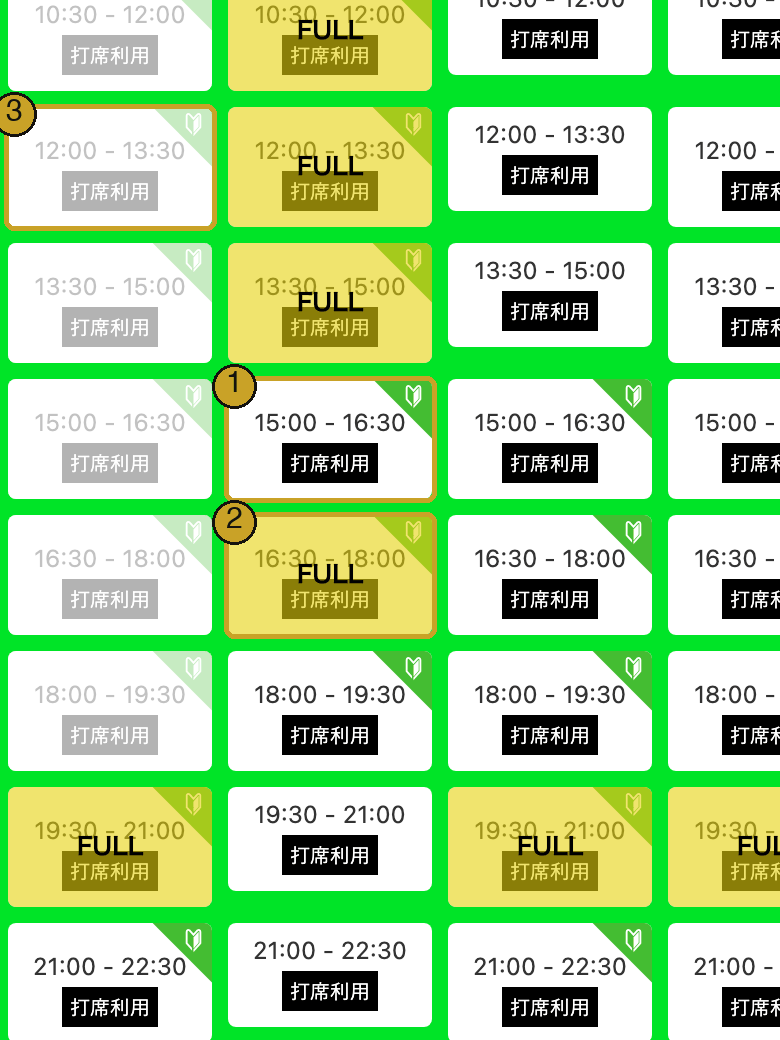
Scroll down to see the afternoon and evening. Each box is one 90-minute slot.
- A slot you can book for the trial has a small green leaf icon (the Japanese beginner’s mark 🔰) in the top-right corner. Trial slots start from 12:00 on weekdays and from 10:30 on weekends.
- FULL = already booked.
- Grey = the time has passed.
打席利用 (“bay use”) is the name of every slot. It does not mean anything extra.
2. Apply for the trial
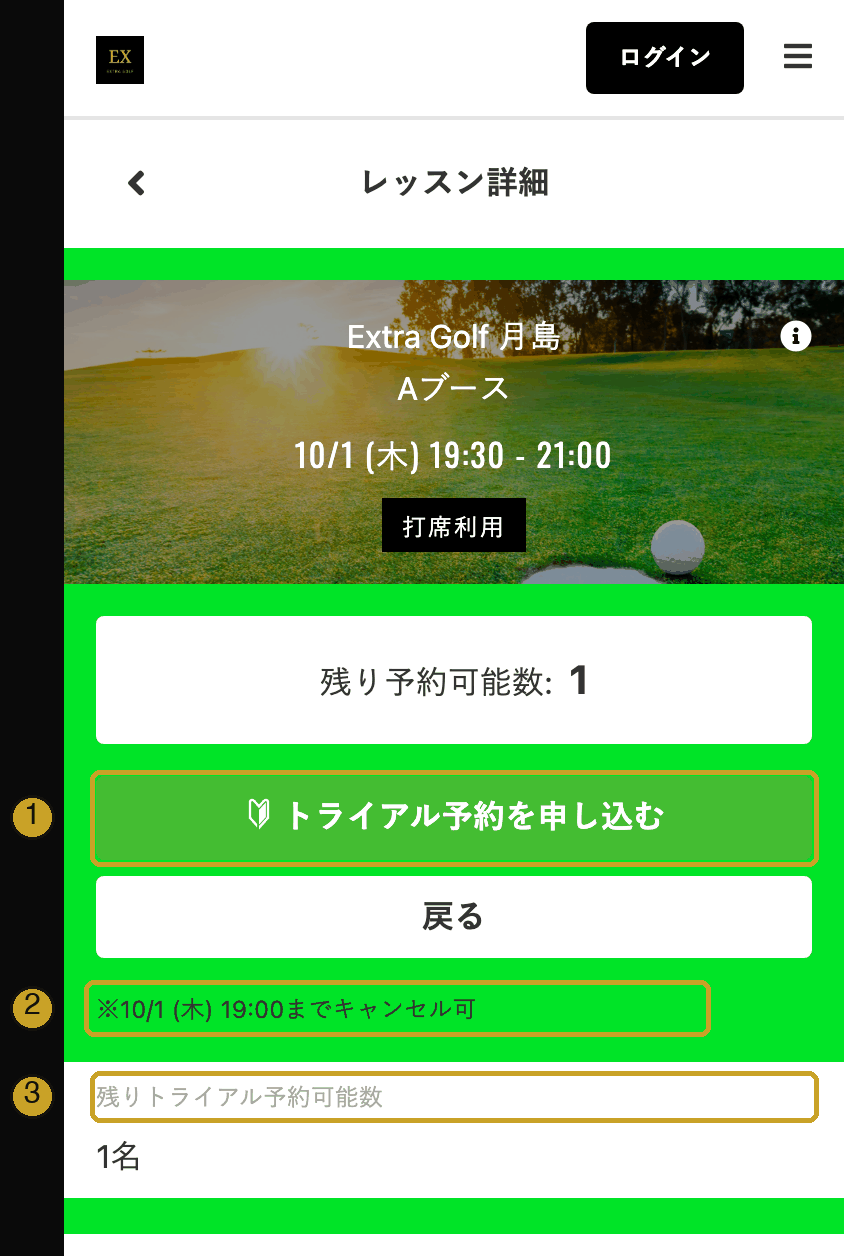
Tap a slot with the leaf icon. The slot details page (レッスン詳細) opens.
- Tap the green button トライアル予約を申し込む — “Apply for a trial booking”.
- …までキャンセル可 = you can cancel online until this time (30 minutes before the start).
- 残りトライアル予約可能数 = trial places left in this slot.
Already have an account? Tap ログイン (Log in) at the top first.
3. Select the free ticket SCREEN 1/6
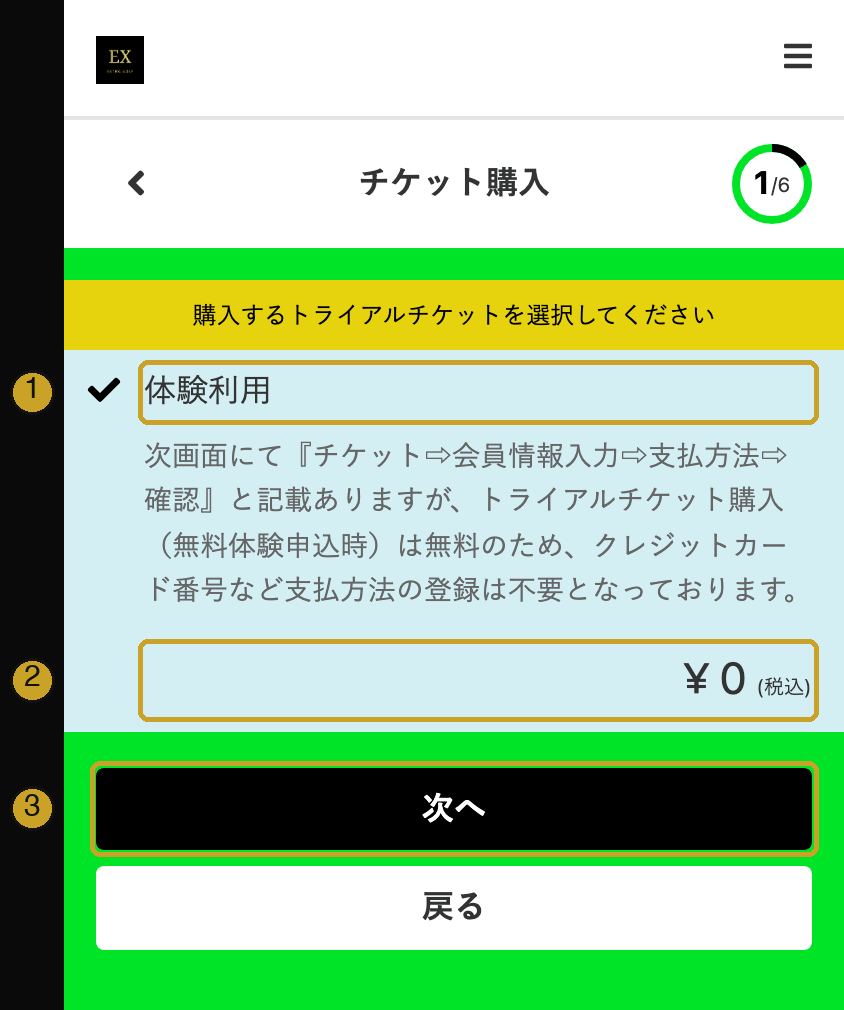
The screen title says チケット購入 (“ticket purchase”), but the trial is free. You will not be asked for card details.
- 体験利用 = trial use. It is already selected.
- ¥ 0 (税込) = ¥0, tax included.
- Tap 次へ (Next).
4. Enter your details SCREEN 2/6
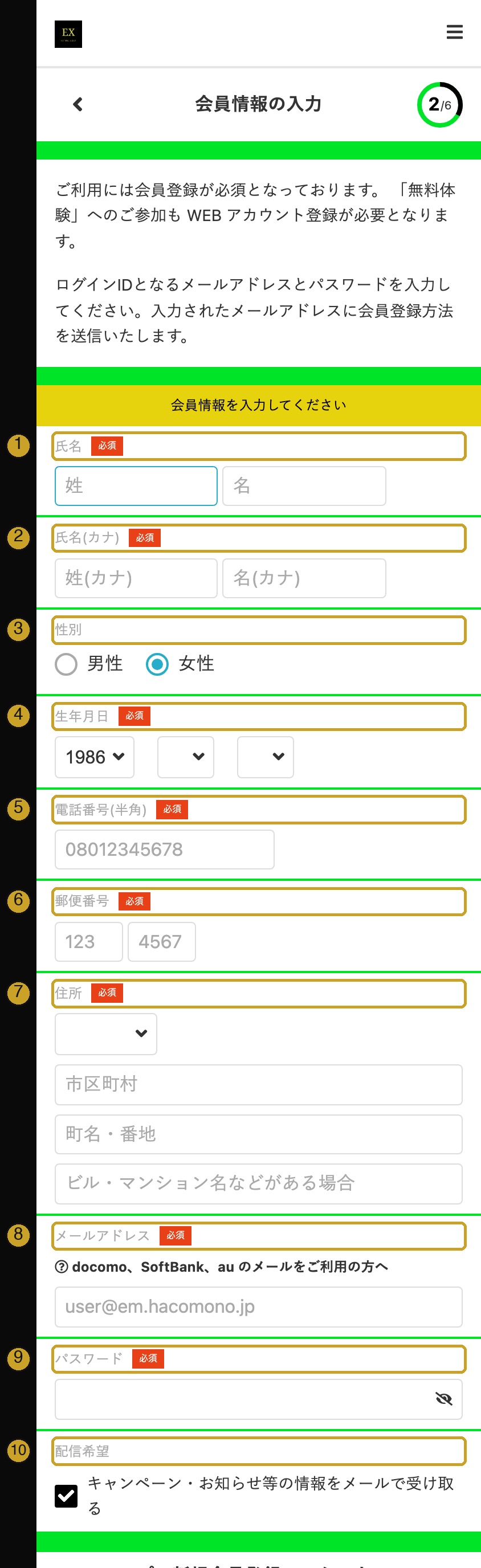
All fields marked 必須 are required.
- 氏名 Name. Left box 姓 = family name, right box 名 = given name. Roman letters are fine.
- 氏名(カナ) Name in katakana. Type your name as it sounds, e.g. Smith → スミス, John → ジョン. Only full-width katakana is accepted (not roman letters or hiragana). Add a Japanese keyboard, type the name in romaji and pick the katakana suggestion.
- 性別 Gender: 男性 = male, 女性 = female. Female is selected by default, so change it if needed.
- 生年月日 Date of birth: year, month, day.
- 電話番号(半角) Phone number, digits only (no hyphens).
- 郵便番号 Postal code: first 3 digits, then 4 digits.
- 住所 Address: choose the prefecture (東京都 = Tokyo), then 市区町村 city/ward, 町名・番地 town and street number, and ビル・マンション名 building or apartment name (if any).
- メールアドレス Email. This becomes your login ID. Booking details are sent here in Japanese.
- パスワード Password. It must contain both letters and numbers and be different from your email address.
- 配信希望 Newsletter by email (optional). Untick if you don’t want it.
Then scroll down and tap 次へ (Next).
If a red message appears
| 入力してください | This field is required. |
|---|---|
| 全角カナで入力してください | Use katakana (see 2 above). |
| 半角で入力してください | Use normal (half-width) letters or numbers. |
| 半角のアルファベットを含めてください | Password: add a letter (a–z). |
| 半角の数字を含めてください | Password: add a number (0–9). |
| …文字以上…文字以下のパスワード… | Password is too short or too long. The numbers show the allowed length. |
| メールアドレスとして正しくありません | The email address is not valid. |
| 生年月日の日付が正しくありません | The date of birth is not valid. |
5. Answer a short survey SCREEN 3/6
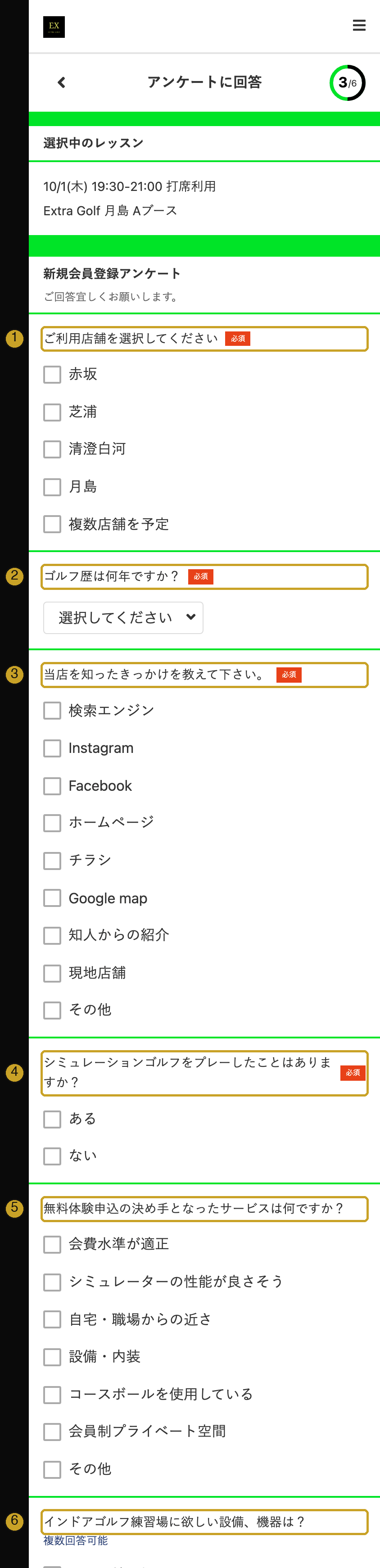
- ご利用店舗を選択してください Which location(s) will you use? (required) 赤坂 Akasaka · 芝浦 Shibaura · 清澄白河 Kiyosumi-shirakawa · 月島 Tsukishima · 複数店舗を予定 more than one
- ゴルフ歴は何年ですか? How long have you played golf? (required) 半年以内 under 6 months · 1年以内 up to 1 year · 3年以内 up to 3 years · 5年以内 up to 5 years · 10年以内 up to 10 years · 10年超 over 10 years
- 当店を知ったきっかけを教えて下さい。 How did you hear about us? (required) 検索エンジン search engine · Instagram · Facebook · ホームページ our website · チラシ flyer · Google map · 知人からの紹介 a friend · 現地店舗 saw the store · その他 other
- シミュレーションゴルフをプレーしたことはありますか? Have you played simulation golf before? (required) ある yes · ない no
- 無料体験申込の決め手となったサービスは何ですか? What made you book? (optional) price · simulator quality · close to home or work · facilities · real course balls · private members-only space · other
- インドアゴルフ練習場に欲しい設備、機器は? What equipment would you like to see? (optional, several allowed)
Then tap 次へ (Next).
6. Skip payment and confirm SCREENS 4/6 – 5/6
支払方法 (Payment method): no card is needed for the free trial. If this screen appears, don’t enter anything. Just tap 次へ (Next).
確認 (Confirmation): check the date, time and location. Then tap the button at the bottom, usually 上記内容で申し込む (“Apply with the details above”). Tapping it means you agree to the terms shown on the screen.
7. Booking complete SCREEN 6/6
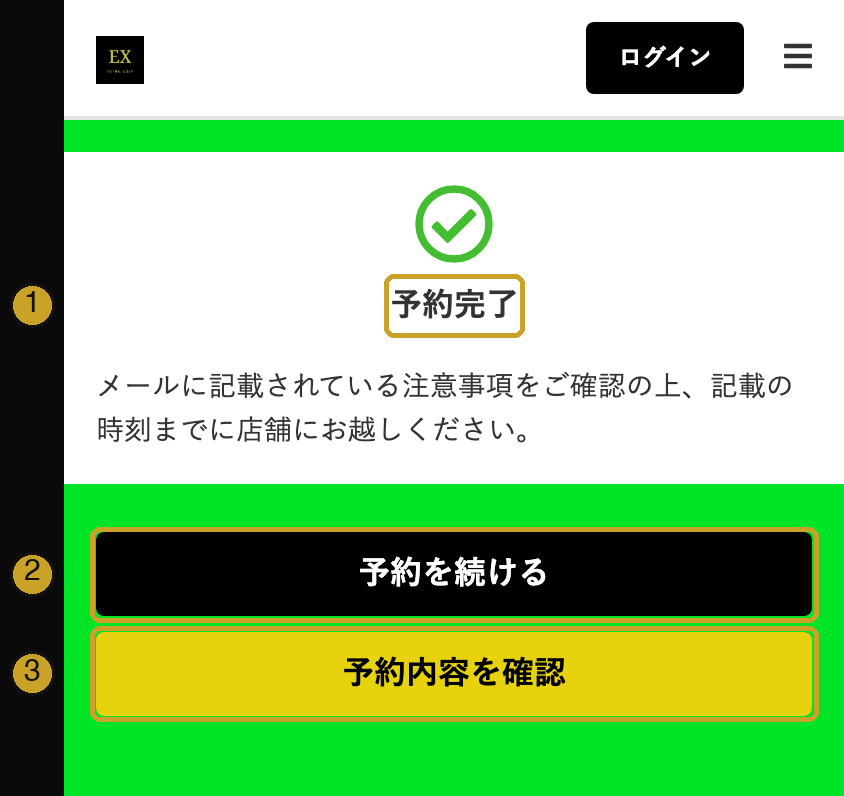
- 予約完了 = booking complete. The message asks you to read the notes in the email we send you and to arrive by your booking time.
- 予約を続ける = make another booking.
- 予約内容を確認 = view your booking.
On the day
- Bring: a golf glove if you have one (we don’t rent gloves), shoes you can move in (sneakers are fine, no spikes) and your smartphone for the QR code. Clubs are free to borrow, and any clothes are fine.
- Enter with your QR code. Log in to the booking site, open マイページ (My page) and tap your booking to show the QR code. Hold it up to the reader at the door. It works from your booking start time.
- Please scan your own QR code, even if someone else opens the door. If you decide to join afterwards, this lets you sign up online.
- A staff member will show you around and explain the simulator (about 15 minutes). The rest of the time is yours to play.
- If the door doesn’t open, turn your screen brightness up and try again, or message us on LINE.
Change or cancel
Open the booking site, log in, and go to 予定管理 (My bookings). You can cancel until the time shown on the slot page (30 minutes before the start).
Japanese words you’ll see
| 予約 | Book / booking |
|---|---|
| 予約スケジュール | Booking calendar |
| スケジュールを絞り込む | Filter the calendar |
| ブース | Booth (private bay) |
| 打席利用 | Bay use (every slot) |
| FULL | Fully booked |
| 残り予約可能数 | Places left |
| 無料体験 | Free trial |
| 新規会員登録 | Sign up |
| ログイン | Log in |
| マイページ | My page |
| 予定管理 | My bookings |
| 必須 | Required |
| 次へ | Next |
| 戻る | Back |
| 確認 | Confirm |
| 予約完了 | Booking complete |
| キャンセル | Cancel |
Need help?
Message us on LINE (EXTRA GOLF official account). Our assistant replies in English (along with Japanese), and our staff will follow up if needed.
This guide reflects the booking site as of September 2026. Screens may change slightly.